> For the complete documentation index, see [llms.txt](https://docs.onfomo.com/llms.txt). Markdown versions of documentation pages are available by appending `.md` to page URLs; this page is available as [Markdown](https://docs.onfomo.com/trading/copy.md).
# Copy Trading
Copy Trading now lets you use Smart Setup to build strategies from your balance and risk level, or Manual for full control.
Copy Trading lets traders automatically follow wallets directly from FOMO's curated Insights collections or from any Hyperliquid address. When the leader opens, increases, or closes a position, the system performs a corresponding action on the follower's account based on the configured strategy.
Browse Smart Traders filtered by performance, risk, and trading style, then copy the ones that fit. Or paste any wallet address and build a strategy from scratch.
Sizing, leverage, exits, and filters are fully configurable. One strategy follows one leader. Multiple strategies can run across different leaders at the same time.
{% hint style="warning" icon="eyes" %}
Copy Trading is not a dollar-for-dollar mirror. Results depend on strategy settings, balance, leverage, timing, and execution conditions.
{% endhint %}
## Before You Start
An available balance is required. Copy Trading uses deposited funds to open positions automatically. Only positions opened after a strategy starts are tracked; pre-existing leader positions will not be copied.
{% hint style="info" icon="info" %}
Learn how to deposit here ↗
{% endhint %}
## How to Get There
A Copy Trading strategy can be started from two places:
#### From Strategies
Open "Home" → **Strategies** → **Create Strategy**, then choose **Smart Setup** or **Manual**. This is the entry point for both flows.
#### From a Wallet Profile
Open "Insights," browse Smart Trader collections (FOMO Smarts, New Whales, High-Efficiency, Safe & Smart, 90%+ Winrate, and others), tap into any wallet profile, and tap **Copy Trade**.
Any Hyperliquid wallet can also be looked up by pasting an address into the search bar at the top of "Insights," where every wallet has a profile page with a Copy Trade button, even outside curated collections.
## Create Strategy
You have two ways to create a strategy:
**Smart Setup** - FOMO recommends wallets and configures the strategy based on your balance and risk level.\
**Manual** - you choose a wallet and configure every setting yourself.
### Smart Setup
Smart Setup turns copy trading into a guided flow. FOMO handles wallet selection, scaling, and Copy Slots based on your balance and chosen style.
Your balance determines how each style is configured, including position sizes and max Copy Slots.
{% stepper %}
{% step %}
#### Select a Style
Pick the risk profile that matches how active you want the setup to be.
**Steady** - fewer trades, lower leverage, reduced risk. Available from $500.\
**Balanced** - moderate activity, balanced leverage, balanced risk.\
**Aggressive** - more trades, higher leverage, higher risk.
{% endstep %}
{% step %}
#### Review the Wallets
FOMO selects wallets that match your style and balance. You can continue with all suggested wallets or keep only the ones you want.
Wallets that are already being copied are marked separately. If you select one again, choose whether to keep the current settings or update them.
{% endstep %}
{% step %}
#### Review the Setup
Check the suggested **Scaling** and **Copy Slots** before you continue.
**Wallets** - the total number of selected wallets.\
**Scaling** - how much balance each strategy uses relative to the copied wallet.\
**Copy Slots** - how many strategies can hold open positions at the same time.
> **Example:** if you create 11 strategies and have 6 Copy Slots, all 11 stay enabled, but only 6 can trade at once.
> {% endstep %}
{% step %}
#### Create Strategies
Each selected wallet becomes a separate strategy.
FOMO Smart Research keeps monitoring the selected wallets 24/7. If a wallet no longer fits the Smart Setup criteria, you will receive an alert and can stop the strategy.
{% endstep %}
{% endstepper %}
{% hint style="warning" icon="eyes" %}
Smart Setup makes configuration easier, but it does not guarantee profit. Copy trading always involves the risk of loss.
{% endhint %}
### Manual
Use Manual if you want full control over every strategy setting.
{% stepper %}
{% step %}
#### Enter a Strategy Name
Pick something recognizable, especially when running several strategies at once.
{% endstep %}
{% step %}
#### Confirm the Leader Wallet
The wallet is pre-filled from the profile or entered manually.
{% endstep %}
{% step %}
#### Set Copy Budget
Sets the maximum margin this strategy can use for the copied wallet. Choose a fixed **Amount** in USD or a **Share** of your current balance.
**Amount** — a fixed USD limit that stays the same when your balance changes.
**Share** — a percentage-based limit that adjusts with your balance.
The budget applies to margin usage, not to the leveraged position size. Funds are not locked or moved to a separate account.
> **Example:** Copy Budget is $1,000 and Scaling is 1×. If the leader uses 20% of their balance as margin, the strategy uses $200 of your margin. Scaling changes the copied trade size, while Copy Budget remains the strategy's margin limit.
Set Copy Budget to the maximum margin you are comfortable allocating to that wallet.
{% endstep %}
{% step %}
#### Choose Scaling
Controls how order size relates to the leader's: **0.5×**, **1×**, **2×**, **5×**.
> **Example №1:** Scaling **2×**. The leader uses 20% of their balance. The strategy uses 40%.
> **Example №2:** Scaling **0.5×**. The leader uses 20% of their balance. The strategy uses 10%.
> {% endstep %}
{% step %}
#### Open Advanced Settings
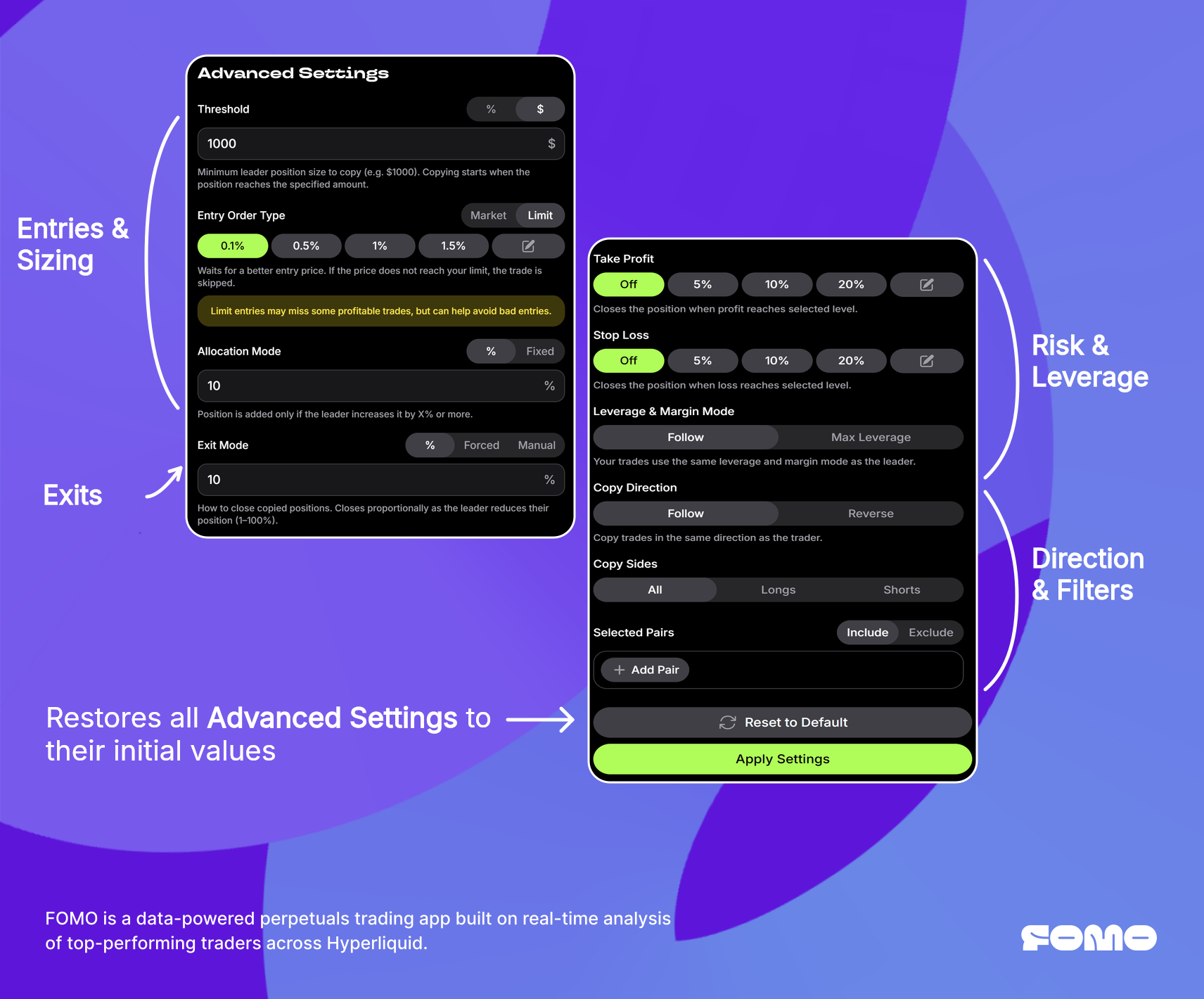
Optionally, open [**Advanced Settings**](#advanced-settings) to fine-tune thresholds, allocation, exits, leverage, and pair filters.
{% endstep %}
{% step %}
#### Tap Start Copy Trade
The strategy goes live immediately.
{% endstep %}
{% endstepper %}
{% hint style="warning" icon="triangle-exclamation" %}
**Check strategies migrated from Max Balance**
If a strategy previously used Max Balance below 100%, review its Copy Budget. The percentage was carried over to the new margin-based metric; for example, 50% Max Balance became a 50% Copy Budget share.
{% endhint %}
### Advanced Settings
All parameters can be changed later via **Edit Strategy**. Changes apply to the next copied trade, not to existing open positions.
{% tabs %}
{% tab title="Sizing" %}
#### Threshold
Sets the minimum leader position size required to trigger a copy.
**%** — positions occupying less than X% of the leader's balance are ignored.
**$** — positions smaller than a fixed dollar amount are ignored.
> **Example №1:** Threshold 5%. Leader's balance is $100,000. A $3,000 position (3%) is ignored. A $6,000 position (6%) triggers a copy.
> **Example №2:** Threshold $1,000. Any leader position below $1,000 is ignored regardless of their balance size.
#### Allocation Mode
Determines how position size is calculated.
**%** — the position scales proportionally to the leader's capital usage. Supports opens, increases, and partial closes.
In this mode, the Threshold (%) setting also applies to position increases: if the leader adds less than the configured percentage, the increase is not copied.
**Fixed** — a set dollar amount is used to open the position once. Subsequent leader increases and partial closes are not mirrored.
> **Example №1:** Allocation %, Scaling 1×. Leader allocates 10% of their $200K balance to BTC long. The strategy opens a proportional position using 10% of the follower's available balance.
> **Example №2:** Allocation Fixed, $50. Regardless of leader's position size, the strategy opens exactly $50. If the leader doubles the position later, nothing changes on the follower side.
> {% endtab %}
{% tab title="Entries" %}
#### Entry Mode
Defines how the strategy opens a position when the leader opens one.
**Market** — enters immediately at the current market price.
**Limit** — places a limit order at a selected percentage better than the leader’s entry price.
For **Long**, the limit is placed below the leader’s entry price. For **Short**, the limit is placed above the leader’s entry price.
Limit entries may skip profitable trades, but help avoid unsuccessful entries.
> **Example №1:** Market Entry. Leader opens a position. The strategy enters immediately at the current market price.
> **Example №2:** Limit Entry, set to 1%. Leader opens a BTC Long at $100,000. The strategy places a limit buy at $99,000. The position opens only if the BTC price reaches the limit price.
#### **Copy Direction**
Сontrols whether the strategy follows or reverses the leader’s trades.
**Follow** — opens positions in the same direction as the leader.\
**Reverse** — opens the opposite position: a leader’s Long becomes a Short, and a Short becomes a Long.
In Reverse mode, opens, increases, partial reductions, closes, and position reversals are mirrored in the opposite direction. Copy Direction can be changed at any time: existing positions switch to **Close only**, while all new trades use the new direction. Budget, Scaling, TP/SL, and limits continue to work as configured.
> **Example №1:** Copy Direction is set to Follow. The leader opens a BTC Long, so the strategy opens a BTC Long. Any increases, reductions, closes, or reversals are copied in the same direction.
> **Example №2:** Copy Direction is set to Reverse. The leader opens a BTC Long, so the strategy opens a BTC Short. When the leader reduces or closes the Long, the user's Short is reduced or closed accordingly.
> {% endtab %}
{% tab title="Exits" %}
#### Exit Mode
Defines how the strategy handles closing when the leader reduces or exits.
**%** — positions close proportionally as the leader reduces theirs.
**Forced** — the entire position closes when the leader reduces their position size (in coins) by the set percentage.
**Manual** — no automatic exits. All positions must be closed by hand.
> **Example №1:** Exit %, set to 10%. Each time the leader's position decreases by another 10%, the strategy closes a proportional amount.
> **Example №2:** Exit Forced, set to 10%. Leader’s BTC position of 1.0 BTC is reduced to 0.9 BTC. The strategy closes the entire follower position.
#### Take Profit / Stop Loss
Sets independent exit levels for the copied position.
**Take Profit** — closes the position when profit reaches the selected level.\
**Stop Loss** — closes the position when loss reaches the selected level.
Presets: **5%**, **10%**, **20%**. Custom values can be entered, or either setting can be left off.
TP/SL and Exit Mode work together. The first condition that is triggered closes the position.
{% endtab %}
{% tab title="Risk & Leverage" %}
#### Leverage & Margin Mode
**Follow Leader** mirrors the leader's leverage and margin mode for every trade.
**Max Leverage** uses the maximum available leverage for each pair, regardless of what the leader uses.
{% endtab %}
{% tab title="Filters" %}
#### Copy Sides
Limits which directions are copied: **All**, **Longs** only, or **Shorts** only.
When set to Longs, any short position the leader opens is skipped. Events will show a Side mismatch entry.
#### Selected Pairs
Controls which assets the strategy copies. Two modes:
**Include** — only the selected pairs are copied. All other assets are ignored, even if the leader actively trades them.
**Exclude** — all pairs are copied except the selected ones.
Pairs are managed through the **Add Pair** screen with search and selection.
{% endtab %}
{% endtabs %}
## Managing a Live Strategy
After launch, the strategy page is the single place to monitor performance and adjust behavior.
The overview at the top tracks how the strategy is performing: PnL, ROI, win rate, volume, and when the last trade was executed. The linked leader wallet makes it easy to revisit the trader's profile and reassess fit at any point.
Copied-wallet cards show the configured Copy Budget and, when the limit is below 100% of your balance, how much has already been used. Budget limits are also shown in Events.
To control exposure quickly, **Pause Strategy** freezes all new copying without touching open positions. This is useful during high-volatility events or when the leader's style temporarily diverges from expectations. **Launch Strategy** resumes from the next new leader trade.
Open positions appear under the **Positions** tab. Each one can be closed individually or all at once through Close All, with a confirmation step. Since copied positions behave like any other position in the account, TP/SL and margin adjustments can be applied at any time, giving full manual control on top of the automated flow.
{% hint style="warning" icon="eyes" %}
If a copied position is manually adjusted (adding or removing size), the strategy continues to track only the original copied amount.
**Example:** if the strategy opens $100 and $50 is added manually, only the original $100 is managed by the strategy. If $50 is removed instead, the position is no longer tracked by the strategy at all.
{% endhint %}
The **History** tab stores closed trades. PnL cards can be shared from here.
{% hint style="info" icon="info" %}
Learn more about PnL Cards here ↗
{% endhint %}
When something doesn't behave as expected, **Events** is the diagnostic tool. Every action the strategy took or skipped is logged with a reason. If a leader opened a position but the strategy didn't follow, Events will show whether it was a threshold filter, a side mismatch, a Copy Budget limit, or an execution failure.
To adjust strategy parameters, tap the pencil icon to open **Edit Strategy**, which mirrors the creation screen (the wallet field is labeled **Copied Wallet** here). Changes take effect on the next trade.
To remove a strategy entirely, tap the trash icon on the Edit screen. All open positions remain and must be closed manually. This action cannot be undone.
## Why Trades May Not Copy
If a trade was expected but didn't appear, the **Events** tab will show the reason.
| Reason | What It Means |
| ----------------------- | -------------------------------------------------------------------- |
| Strategy paused | New trades are not copied while paused |
| Pair filtered | The pair is excluded in Selected Pairs |
| Threshold not met | Leader's position was below the configured Threshold |
| Budget limit | The strategy reached its Copy Budget limit |
| Insufficient balance | Available balance cannot cover the minimum order size ($10) |
| Order failed | The order could not be filled due to market conditions |
| Side mismatch | Leader's direction conflicts with the Copy Sides setting |
| No position in strategy | Leader closed a position that was opened before the strategy started |
## FAQ
Why does PnL differ from the leader's?
Prices, leverage, timing, and strategy settings all shape the outcome. Copy Trading interprets leader trades through configured parameters, so exact matches are not expected.
Why wasn't a pre-existing leader position copied?
Only positions opened after the strategy starts are tracked.
Can copied positions be closed manually?
Yes. Full control over all positions is retained at all times.
What happens on pause?
New trades stop copying. Open positions remain untouched.
What happens on delete?
The strategy is removed. Open positions stay open until closed manually. Cannot be undone.
Can any wallet be copied, even outside Insights?
Yes. Paste any Hyperliquid address in the "Insights" search bar or during strategy creation.
Can two strategies follow the same leader?
No. One strategy per leader.